
From 2009-3-13 to 2009-9-12, you may easy to get 30% discount , or even free to get the code.
It’s mean: You can save 30% money when you buy a license for WinMount with the coupon.
Not $49, only $34.3. Even $0
Take the opportunity and buy a license at an attractive price !
How to get the coupon?
1.Please send them a mail (coupon@winmount.com) with subject "WinMount coupon"and get your coupon code.
2. Get more discount:
please write a review or press for WinMount in your blog or other platform;
send us a mail with subject "WinMount coupon", and provide them the address of your blog or other platfom that we can check it;
3. In normal, they will reply you in 2 work days.
How to use the coupon?
http://www.regnow.com/softsell/nph-softsell.cgi?item=15593-1
Please click button (order now), and input your coupon code, then (update) it, the code will come into effect.
Steps: http://www.winmount.com/discount/help.gif
(Offer expires on: 9/12/2009)

2009-03-09
WinMount Review
In normal, we used compressed archives, and we need to decompress them with some software, such as WinRAR/WinZIP. Decompression is almost inevitable operation when use these compressed archives, and we have no other way to replace it. Decompression of small sized archives may be bearable, but in case of big sized archives, such as 800M or 1G large even larger, it will take long time. Besides, it will cause CPU occupancy rate very high, and it also requires large disc space for store files, which are unpacked from the archives. After used, you have to delete those files again. What a complicated process!
Mounting has broken this rule. It makes compressed archives to be used without decompression. Just need a software--WinMount (the size is small). WinMount is a new conception of file management. It provides a revolutionary way to use compressed archives. Files can be used directly by WinMount with mounting files/folders as virtual drive.
What is WinMount and let's test it?
Info:
Language: English
Version: 3.2 for 32-bit
Type: Application /file management
System platform: 2000/XP/2003/Vista
Download it form here: http://www.winmount.com/down/winmount_setup.exe
Screenshot:
1. Software Overview
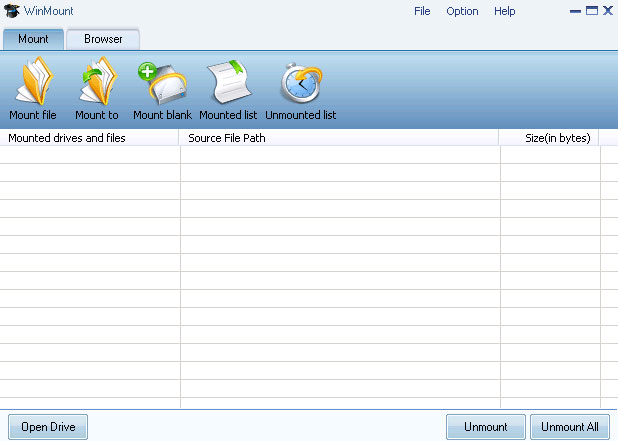
It’s easy to install WinMount on Vista, and you just need to click “Next” all the way to complete installation. In the main interface, both “File” and “Mount” menus can mounting archives such as RAR, ZIP, or image files such as ISO, BIN, NRG, CUE, CCD into virtual drives. Such virtualized drives can be unmounted with “Unmount” command in the “Option” menu or the "Unmount" and "Unmount All" button in the bottom. On the toolbar, there are quick buttons: “Mount file”, “Mount to”, “Mount blank”,"Unmount list" and “Switch View ”, which are allowing users to carry out quick operation.
2. Features:
Mount:
It's a new concept in file management. It's useful in use compressed archives /images files or other formats files.
Test: Click "mount file" button, choose a ZIP file, "Open", you will find this Window:

< What is MOU?
MOU is a new file format that is copyright by WinMount, although it does not popular as other formats, but it has a great advantage: it defines a new compression standard. A MOU file can be mounted to a virtual disk or a local folder in an instant, whatever the size of MOU is 1G or larger. Worth Mentioning: MOU also has a high compress rate and WinMount supports converting other compressed formats to MOU formats. >
If I click "no", you will find this:

The winmount.zip has been mounted as a virtual disk "Y:” and now you may use this archive.
If you do not want to use it anymore, just choose it in the task management, and then click "Unmount" button, the virtual disk "Y:" will be unmounted.
Of cause, you may view the unmounted files in "Unmounted list":

Compression/Extraction:
Like most file compression programs, WinMount includes the ability to create archives. In my test, WinMount has a mode for compress files, and it supports compressing MOU/ZIP/7Z/ISO
Of cause, you may use the right-click do this (as other software)
WinMount is fully functional in Windows Explorer. We really like that you can pack or unpack an archive using your right-click control.
Some unique features include automatically detecting the origins after you are compressing. Using the Settings menu, you can change which files WinMount is associated with, where your default paths go, and more. And you can see the ratio of your compressed files by selecting the “info” in “Browse mode”(you may choose it in “Switch View”).
3. Help and Support:
WinMount provides all the essential help and support options a good piece of software requires, including a comprehensive “help topic”, FAQ and knowledge base. And, if you still can’t find what you're looking for, you can contact WinMount by email.
Tips:
1. Compressing large number of files in same type in a .MOU, such as DOC files, it can save space and facilitate management; moreover, those files can be directly opened and viewed with WinMount without decompression;
2. After mounting, the archives/image files such as including games or multimedia teaching software can be run or installed without decompression;
3. As a file management tool, WinMount not only supports mounting archives, but also supports mounting image files in various formats for easy use. It also can be used to install large software such as Vista or games.
4. You can create a WMT with WinMount, it can be saved after unmounted, you may place your temp files in it.
5. You can define the path of index files, which is generated when mounting large ZIP/RAR in first time. You may copy and paste them to other PCs, and then you should not wait when you mounting these large files in first time.
Summary:
WinMount is a new file management software, but it has more reviews by users, and although it has some deficiencies, but a good software needs development. If you use it, you will find WinMount is worth to choose.
Mounting has broken this rule. It makes compressed archives to be used without decompression. Just need a software--WinMount (the size is small). WinMount is a new conception of file management. It provides a revolutionary way to use compressed archives. Files can be used directly by WinMount with mounting files/folders as virtual drive.
What is WinMount and let's test it?
Info:
Language: English
Version: 3.2 for 32-bit
Type: Application /file management
System platform: 2000/XP/2003/Vista
Download it form here: http://www.winmount.com/down/winmount_setup.exe
Screenshot:
1. Software Overview
It’s easy to install WinMount on Vista, and you just need to click “Next” all the way to complete installation. In the main interface, both “File” and “Mount” menus can mounting archives such as RAR, ZIP, or image files such as ISO, BIN, NRG, CUE, CCD into virtual drives. Such virtualized drives can be unmounted with “Unmount” command in the “Option” menu or the "Unmount" and "Unmount All" button in the bottom. On the toolbar, there are quick buttons: “Mount file”, “Mount to”, “Mount blank”,"Unmount list" and “Switch View ”, which are allowing users to carry out quick operation.
2. Features:
Mount:
It's a new concept in file management. It's useful in use compressed archives /images files or other formats files.
Test: Click "mount file" button, choose a ZIP file, "Open", you will find this Window:

< What is MOU?
MOU is a new file format that is copyright by WinMount, although it does not popular as other formats, but it has a great advantage: it defines a new compression standard. A MOU file can be mounted to a virtual disk or a local folder in an instant, whatever the size of MOU is 1G or larger. Worth Mentioning: MOU also has a high compress rate and WinMount supports converting other compressed formats to MOU formats. >
If I click "no", you will find this:

The winmount.zip has been mounted as a virtual disk "Y:” and now you may use this archive.
If you do not want to use it anymore, just choose it in the task management, and then click "Unmount" button, the virtual disk "Y:" will be unmounted.
Of cause, you may view the unmounted files in "Unmounted list":

Compression/Extraction:
Like most file compression programs, WinMount includes the ability to create archives. In my test, WinMount has a mode for compress files, and it supports compressing MOU/ZIP/7Z/ISO
Of cause, you may use the right-click do this (as other software)
WinMount is fully functional in Windows Explorer. We really like that you can pack or unpack an archive using your right-click control.
Some unique features include automatically detecting the origins after you are compressing. Using the Settings menu, you can change which files WinMount is associated with, where your default paths go, and more. And you can see the ratio of your compressed files by selecting the “info” in “Browse mode”(you may choose it in “Switch View”).
3. Help and Support:
WinMount provides all the essential help and support options a good piece of software requires, including a comprehensive “help topic”, FAQ and knowledge base. And, if you still can’t find what you're looking for, you can contact WinMount by email.
Tips:
1. Compressing large number of files in same type in a .MOU, such as DOC files, it can save space and facilitate management; moreover, those files can be directly opened and viewed with WinMount without decompression;
2. After mounting, the archives/image files such as including games or multimedia teaching software can be run or installed without decompression;
3. As a file management tool, WinMount not only supports mounting archives, but also supports mounting image files in various formats for easy use. It also can be used to install large software such as Vista or games.
4. You can create a WMT with WinMount, it can be saved after unmounted, you may place your temp files in it.
5. You can define the path of index files, which is generated when mounting large ZIP/RAR in first time. You may copy and paste them to other PCs, and then you should not wait when you mounting these large files in first time.
Summary:
WinMount is a new file management software, but it has more reviews by users, and although it has some deficiencies, but a good software needs development. If you use it, you will find WinMount is worth to choose.
Subscribe to:
Posts (Atom)
